 Flux Tag
Scan it. Make it. Clone its look.
A free QR app that reads every common code, makes styled QR codes with your colors and logo, and can rebuild the look of a QR code you photograph with your own content.
Download for AndroidVersion 1.0.1 · Android 8.0 or newer · free, with ads · 4.7 MB
SHA-256: 727a6e9a4c4028e072bd5030e6aea20450532f04d50d77b3e8c4d25cc1b3402b
Scan
QR codes and common barcodes, from the camera or a photo. Links, Wi-Fi, contacts, email, phone, SMS and places.
Safe links
Nothing opens by itself. You see the full address first, with a warning for look-alike, short or insecure links.
Create
Colors, rounded squares or dots, eye styles, your logo in the middle. Export PNG or SVG.
Clone
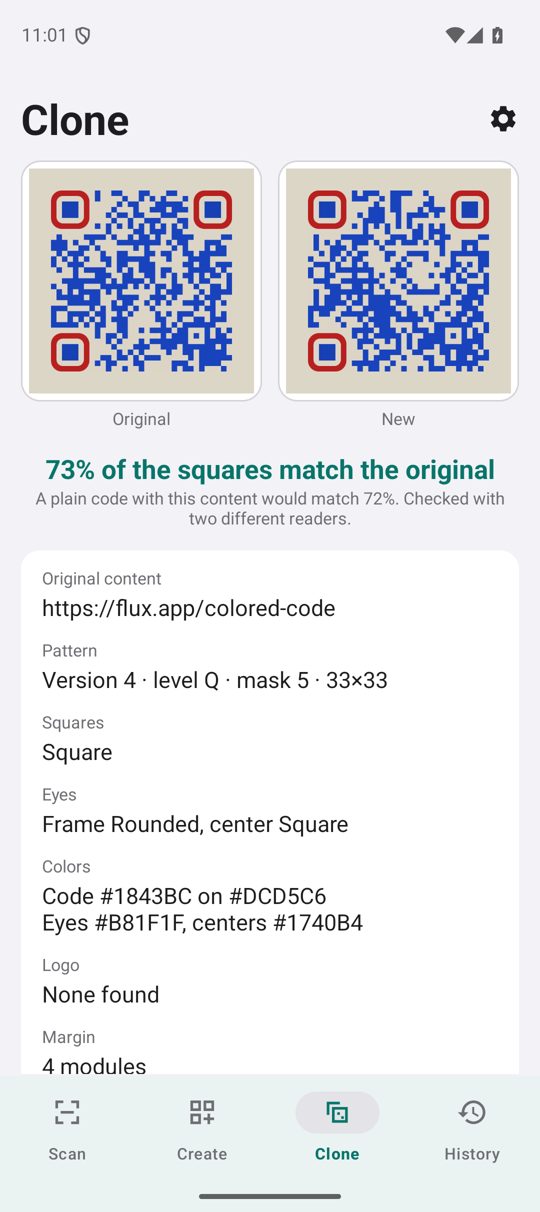
Photograph a QR code you like. Flux Tag finds its colors, shapes, eyes and logo, then builds yours to match.
How Clone works
Flux Tag reads the photographed code with its own QR engine: version, error-correction level, mask, colors, square and eye shapes, margin and logo. Your new code uses the same version, level and mask, and the bits the standard leaves free are chosen so that as many squares as possible match the original, starting around the logo. The app shows how many squares match and checks the new code with two different readers before you can save it.
Limits: standard QR codes only (not Micro QR, and not designer codes whose squares are pictures). A match can never be 100%: new content means new data, and the code must stay readable. If your content does not fit the original size, the app says so and offers the smallest size that fits.
Private by design
Everything runs on your phone. There is no account, and your history stays on the phone. Read the privacy policy.
Why free?
Flux Tag shows a small banner on the Create and History screens and, now and then, an ad after you export a code. Never while you scan.